Multimodal Image Feature Pipeline with MaxFrame#
Background#
Enterprise data platforms increasingly rely on multimodal data such as images, text, audio, and video. These data assets are often heterogeneous and unstructured, making them difficult to use directly for search, recommendation, moderation, clustering, and analytics.
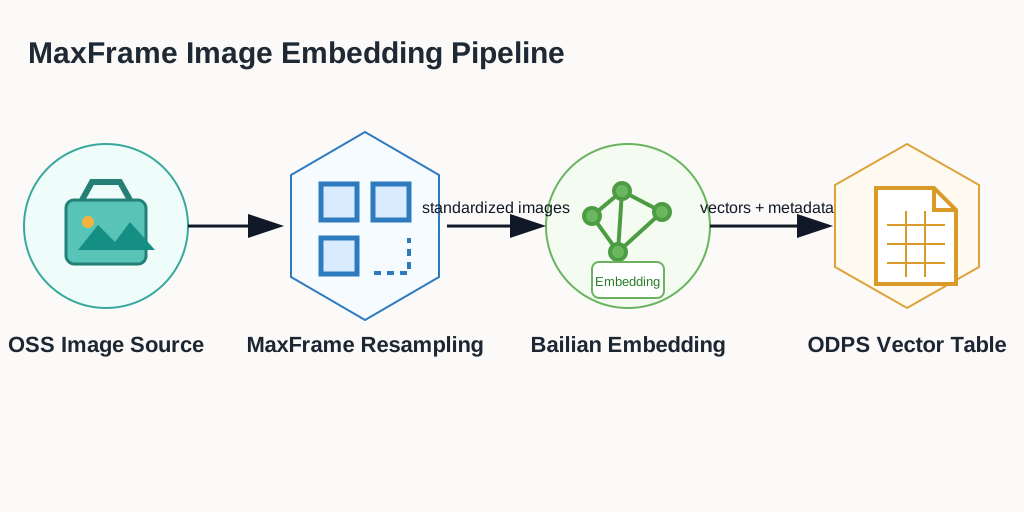
A practical pattern is to standardize the pipeline: download and decode raw files, normalize formats, run semantic understanding, generate labels, extract embeddings, and store vectors in a reusable feature table.
This tutorial demonstrates a multimodal image feature pipeline on MaxFrame: distributed image preprocessing, semantic embedding inference, and table persistence for downstream retrieval, recommendation, moderation, clustering, and analytics.
Applicable scenarios#
Multimodal retrieval and similar-content recall.
Feature generation for recommendation and ranking systems.
Content understanding, moderation, and quality analysis.
Deduplication and clustering using vector similarity.
Reusable feature asset construction for enterprise data governance.
Data preparation for RAG, knowledge base, and agent applications.
Core workflow#
Prerequisites#
# |
Requirement |
Description |
|---|---|---|
1 |
MaxCompute enabled |
A MaxCompute project with valid Access ID / Access Key. |
2 |
DPE enabled |
Image operators and |
3 |
Images uploaded to OSS |
Create your own OSS bucket and upload the five sample images used by this tutorial. |
4 |
OSS RAM role authorization |
Configure Role ARN for OSS read access. |
5 |
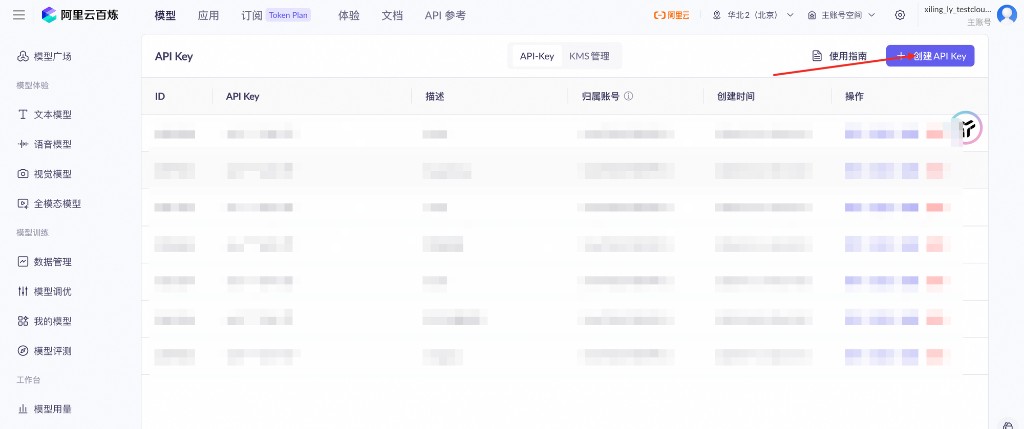
DashScope API key |
Create an API key for multimodal embedding calls. |
6 |
MaxFrame SDK version |
Use MaxFrame SDK 2.6.0 or above ( |
Configure OSS RAM role#
Refer to the service enablement and authorization section in
OSS mounting and use practices
to create an OSS bucket and a RAM role with OSS read permission. In this
example, the code only needs the RAM role ARN passed through with_fs_mount
as storage_options={"role_arn": ROLE_ARN}.
The service-linked-role step shown in the console guide is not used by this
example. If your MaxCompute service has already been enabled, focus on the RAM
role and OSS permission configuration needed by role_arn.
Get DashScope API key#
Create or manage your API key in DashScope console: DashScope API Key management.
Environment setup#
import maxframe

assert maxframe.__version__ >= "2.6.0", (
    f"maxframe >= 2.6.0 is required, current version: {maxframe.__version__}. "
    f"Please run: pip install --upgrade maxframe"
)

import pandas as pd
import maxframe.dataframe as md
from maxframe import new_session
from maxframe.udf import with_python_requirements, with_fs_mount
from maxframe.config import options
from odps import ODPS

pd.set_option("display.max_colwidth", None)
pd.set_option("display.max_columns", None)

options.dag.settings = {"engine_order": ["DPE", "MCSQL"]}
options.dpe.settings = {
    "substep.internal_network_whitelist": [
        "intranet-cn-beijing.dashscope.aliyuncs.com:443",
    ],
}

DASHSCOPE_API_KEY = "<your_dashscope_api_key>"
ROLE_ARN = "acs:ram::<your_account_id>:role/<your_role_name>"
OSS_ENDPOINT = "<your_oss_endpoint>"  # for example: oss-cn-hangzhou.aliyuncs.com
OSS_BUCKET = "<your_oss_bucket>"
OSS_IMAGE_PREFIX = "maxframe-image-demo/"

o = ODPS(
    access_id="<your_access_id>",
    secret_access_key="<your_access_key_secret>",
    project="<your_mc_project>",
    endpoint="https://service.<region>.maxcompute.aliyun.com/api",
)
session = new_session(o)
print(f"Session ID : {session.session_id}")
print(f"LogView    : {session.get_logview_address()}")
1. Build input dataset#
Upload these five images to oss://<your_oss_endpoint>/<your_oss_bucket>/maxframe-image-demo/
before running this section. The names in IMAGE_FILES must exactly match
the objects in your OSS bucket.
IMAGE_FILES = ["img_001.jpg", "img_002.jpg", "img_003.jpg", "img_004.png", "img_005.jpg"]

df = md.DataFrame({
    "id": list(range(1, len(IMAGE_FILES) + 1)),
    "filename": IMAGE_FILES,
})

# Production path:
# df = md.read_odps_table("your_image_table", columns=["id", "filename"])
2. Download, decode, and resize images#
@with_fs_mount(
    path=f"oss://{OSS_ENDPOINT}/{OSS_BUCKET}/{OSS_IMAGE_PREFIX}",
    mount_path="/mnt/oss_data",
    storage_options={"role_arn": ROLE_ARN},
)
@with_python_requirements("Pillow==10.4.0")
def download_and_process(filename_series, target_size=(512, 512)):
    import io
    import base64
    import pandas as pd
    from PIL import Image

    results = []
    widths, heights, formats = [], [], []
    for fname in filename_series:
        try:
            img_path = f"/mnt/oss_data/{fname}"
            img = Image.open(img_path)
            widths.append(img.width)
            heights.append(img.height)
            formats.append(img.format)

            img = img.convert("RGB").resize(target_size, Image.LANCZOS)
            buf = io.BytesIO()
            img.save(buf, format="JPEG", quality=85)
            results.append(base64.b64encode(buf.getvalue()).decode("utf-8"))
        except Exception:
            results.append(None)
            widths.append(None)
            heights.append(None)
            formats.append(None)

    return pd.DataFrame(
        {
            "width": widths,
            "height": heights,
            "format": formats,
            "img_base64": results,
        },
        index=filename_series.index,
    )

result_df = df["filename"].mf.apply_chunk(
    download_and_process,
    output_type="dataframe",
    dtypes={
        "width": "float64",
        "height": "float64",
        "format": "object",
        "img_base64": "object",
    },
    skip_infer=True,
    target_size=(512, 512),
)

df["width"] = result_df["width"]
df["height"] = result_df["height"]
df["format"] = result_df["format"]
df["img_base64"] = result_df["img_base64"]
df = df.execute()
3. Multimodal embedding inference#
Note
For large-scale production workloads, request higher API concurrency limits to avoid 429/403 throttling. If the task times out, open LogView first and check whether OSS mount, image file names, RAM role permissions, and DashScope network access are all valid.
@with_python_requirements("dashscope>=1.24.6")
def embed_images(base64_series, api_key=None, max_retries=3):
    import time
    import pandas as pd
    import dashscope
    from dashscope import MultiModalEmbedding

    dashscope.api_key = api_key
    dashscope.base_http_api_url = "https://intranet-cn-beijing.dashscope.aliyuncs.com/api/v1"

    results = []
    for b64_str in base64_series:
        if not b64_str:
            results.append(None)
            continue
        for attempt in range(max_retries):
            resp = MultiModalEmbedding.call(
                model="tongyi-embedding-vision-flash-2026-03-06",
                input=[{"image": f"data:image/jpeg;base64,{b64_str}"}],
            )
            if resp.status_code == 200:
                results.append(resp.output["embeddings"][0]["embedding"])
                break
            if attempt < max_retries - 1:
                time.sleep(2**attempt)
            else:
                results.append(None)

    return pd.Series(results, index=base64_series.index)

df["embedding"] = df["img_base64"].mf.apply_chunk(
    embed_images,
    output_type="series",
    dtype="object",
    skip_infer=True,
    batch_rows=5,
    index=df["img_base64"].index,
    api_key=DASHSCOPE_API_KEY,
)

df = df.execute()
print(df.fetch())
4. Persist embeddings to MaxCompute#
md.to_odps_table(
    md.DataFrame(df),
    "image_embedding_result",
    overwrite=True,
).execute()

print("Results written to table: image_embedding_result")
5. Cleanup#
print(f"LogView: {session.get_logview_address()}")
session.destroy()
print("Session destroyed.")
Troubleshooting#
Issue |
Cause |
Resolution |
|---|---|---|
|
DPE is not enabled |
Ask admin to enable DPE in project. |
|
Wrong or missing role permissions |
Verify |
|
Invalid API key |
Check API key status in DashScope console. |
Embedding is |
Per-image inference failure |
Verify image integrity and base64 generation. |
Inconsistent vector dimensions |
Different embedding models were mixed |
Use one embedding model per batch/output table. |