MaxFrame Multimodal Audio Operator Practice#
Background#
As multimodal foundation models and speech applications grow quickly, audio becomes a key data source for training and content understanding. Workloads such as ASR, subtitle generation, speech retrieval, and corpus preparation all require reliable text extraction from large-scale raw audio.
In production, audio files are usually scattered across storage locations with inconsistent formats, durations, and quality. Traditional pipelines rely on many separate tools for download, transcoding, transcription, and aggregation, which increases development and operational complexity at scale.
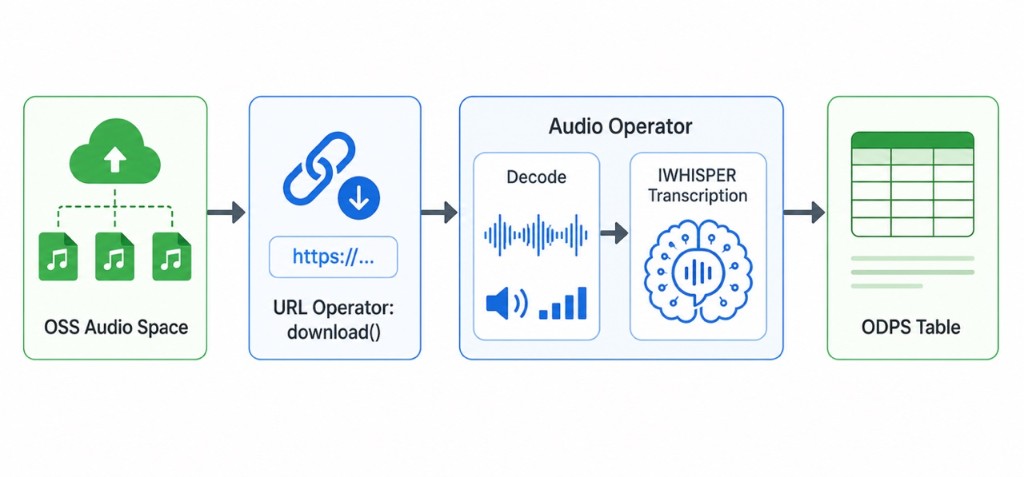
With MaxCompute + MaxFrame, you can run a unified distributed pipeline from OSS audio ingestion to structured transcription output. This tutorial focuses on practical audio processing with built-in MaxFrame .audio operators.
Use cases#
Speech transcription for podcasts, courses, interviews, and meeting recordings.
Subtitle generation and text extraction from audio tracks in media files.
Training data preparation for speech recognition and speech understanding models.
Structured processing for customer service calls and business recordings.
Pipeline#
Prerequisites#
# |
Requirement |
Description |
|---|---|---|
1 |
MaxCompute enabled |
A MaxCompute project with valid Access ID / Access Key. |
2 |
DPE enabled |
|
3 |
Audio uploaded to OSS |
Source audio files are available in a target OSS bucket. |
4 |
OSS RAM role authorization |
Configure Role ARN for |
5 |
MaxFrame SDK version |
Use MaxFrame SDK 2.7.0 or above ( |
Configure OSS RAM role#
When using .url.download(storage_options={"role_arn": ...}), MaxFrame reads OSS data by assuming a RAM role. Make sure:
The role has OSS read permission (for example
AliyunOSSReadOnlyAccess).The role trust policy allows MaxCompute service to assume the role.
Environment setup#
MaxCompute placeholders:
ODPS_ACCESS_ID = "<REDACTED_ACCESS_ID>"
ODPS_ACCESS_KEY = "<REDACTED_ACCESS_KEY>"
ODPS_PROJECT = "<REDACTED_PROJECT>"
ODPS_ENDPOINT = "<REDACTED_ENDPOINT>"
OUTPUT_TABLE = "<REDACTED_OUTPUT_TABLE>"
OSS placeholders:
ROLE_ARN = "<REDACTED_ROLE_ARN>"
OSS_ENDPOINT = "<REDACTED_OSS_ENDPOINT>"
OSS_BUCKET_NAME = "<REDACTED_OSS_BUCKET_NAME>"
OSS_DATA_PREFIX = "<REDACTED_OSS_DATA_PREFIX>"
Complete code example#
Initialize ODPS and MaxFrame session:
import maxframe

assert maxframe.__version__ >= "2.7.0", (
    f"maxframe >= 2.7.0 is required, current version: {maxframe.__version__}. "
    f"Please run: pip install --upgrade maxframe"
)
print(f"maxframe version: {maxframe.__version__} ✓")

import pandas as pd
import maxframe.dataframe as md
from maxframe import new_session
from maxframe.config import options
from odps import ODPS

o = ODPS(
    access_id=ODPS_ACCESS_ID,
    secret_access_key=ODPS_ACCESS_KEY,
    project=ODPS_PROJECT,
    endpoint=ODPS_ENDPOINT,
)

options.sql.enable_mcqa = False
options.dag.settings = {"engine_order": ["DPE"]}

session = new_session(o)
print(f"Session ID : {session.session_id}")
print(f"LogView    : {session.get_logview_address()}")
Build OSS audio URL list:
file_names = ["audio_011.flac"]
audio_urls = [
    f"oss://{OSS_ENDPOINT}/{OSS_BUCKET_NAME}/{OSS_DATA_PREFIX}{name}"
    for name in file_names
]
print(f"Processing {len(audio_urls)} audio files:")
for u in audio_urls:
    print(f"  - {u}")
Use .audio operators for decode, language detection, transcription, and VAD:
df = md.DataFrame(pd.DataFrame({"name": file_names, "url": audio_urls}))

# Download OSS audio as bytes via RAM role
df["audio_bytes"] = df["url"].url.download(
    storage_options={"role_arn": ROLE_ARN},
    errors="raise",
)

# Decode to target sample rate
df["decoded"] = df["audio_bytes"].audio.decode(target_sample_rate=16000)

# Basic properties
df["sample_rate"] = df["decoded"].audio.sample_rate
df["duration"] = df["decoded"].audio.duration
df["format"] = df["decoded"].audio.format

# Language detection
df["language"] = df["audio_bytes"].audio.detect_language(
    max_duration_sec=30.0,
    cpu=4,
    memory="16GiB",
)

# Speech-to-text
transcribed = df["audio_bytes"].audio.transcribe(cpu=4, memory="16GiB")
df["text"] = transcribed["text"]

# Voice activity detection
df["vad"] = df["audio_bytes"].audio.vad_detect(threshold=0.5)

result_df = df[[
    "name",
    "sample_rate",
    "duration",
    "format",
    "language",
    "text",
    "vad",
]]
md.to_odps_table(result_df, OUTPUT_TABLE, overwrite=True).execute()
print(result_df.execute().fetch())
Cleanup:
session.destroy()
Technical highlights#
Direct OSS ingestion with
.url.download()and no object table dependency.Built-in distributed audio operators for decode, metadata, language detection, transcription, and VAD.
Flexible resource control for CPU/GPU style workloads through operator and engine parameters.
Low operational overhead by reusing MaxCompute elastic compute and storage stack.
Troubleshooting#
OSS access denied#
Symptom: .url.download(storage_options={"role_arn": ...}) fails with an access denied error.
Cause: Wrong or missing role permissions.
Solution: Verify the following:
Role ARN is correct — double-check the
role_arnvalue instorage_optionsmatches the RAM role configured in the Alibaba Cloud console.OSS read permission — ensure the RAM role has the
AliyunOSSReadOnlyAccesspolicy (or equivalent custom policy) attached, grantingoss:GetObjectpermission on the target bucket.