Bailian LLM Calling Tutorial#
This tutorial explains how to access models in the Bailian public modelset from MaxFrame and run both text embedding and text generation workloads on DPE.
Key tasks covered:
Browse available models in
BIGDATA_PUBLIC_MODELSET.Inspect model metadata and inference parameters.
Run text embedding inference with
embed().Run text generation inference with
generate().Persist outputs to MaxCompute tables.
Prerequisites#
# |
Requirement |
Description |
|---|---|---|
1 |
MaxCompute enabled |
You need a MaxCompute project with valid Access ID / Access Key. |
2 |
DPE engine enabled |
Bailian AI Function calls in this workflow run through DPE. |
3 |
Model compute service purchased |
Purchase model compute service in MaxCompute console; an inference quota is created and billed by usage. |
4 |
Supported region |
Ensure your MaxCompute project is in a region where Bailian model services are available. |
5 |
Python version |
Python 3.11 is recommended. |
6 |
MaxFrame SDK version |
Use MaxFrame SDK 2.6.0 or above ( |
Model compute service and inference quota#
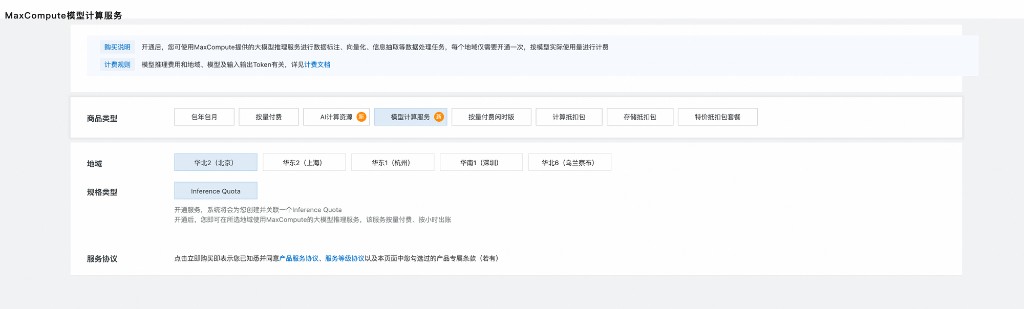
In MaxCompute console, purchase/enable model compute service and confirm the associated inference quota before running Bailian model inference.
1. Environment setup and session creation#
Check MaxFrame version:
import maxframe

assert maxframe.__version__ >= "2.6.0", (
    f"maxframe >= 2.6.0 is required, current version: {maxframe.__version__}. "
    f"Please run: pip install --upgrade maxframe"
)
print(f"maxframe version: {maxframe.__version__} ✓")
Imports:
import logging

import pandas as pd
import maxframe.dataframe as md
from maxframe import new_session
from maxframe.config import options
from maxframe.learn.utils import read_odps_model
from odps import ODPS

logging.basicConfig(level=logging.INFO)
pd.set_option("display.max_colwidth", None)
pd.set_option("display.max_columns", None)
Configure engine and create session:
o = ODPS(
    access_id="<your_access_id>",
    secret_access_key="<your_access_key>",
    endpoint="https://service.<region>.maxcompute.aliyun.com/api",
    project="<your_project_name>",
)

options.dag.settings = {"engine_order": ["DPE", "MCSQL"]}
options.session.inference_quota_name = "<your_inference_quota_name>"

session = new_session(o)
print(f"Session ID : {session.session_id}")
print(f"LogView    : {session.get_logview_address()}")
Note
Keep the LogView URL for troubleshooting. It is the main entry for worker logs and runtime diagnostics.
2. Browse Bailian public modelset#
available_models = list(o.list_models(project="bigdata_public_modelset"))
print(f"Available model count: {len(available_models)}")
for m in available_models:
    print(f"  - {m.name}")
3. Inspect model details#
model = o.get_model("text-embedding-v4", project="bigdata_public_modelset")

print(f"name: {model.name}")
print(f"type: {model.type}")
print(f"source_type: {model.source_type}")
print(f"options: {model.options}")
print(f"_feature_columns: {model._feature_columns}")
print(f"inference_parameters: {model.inference_parameters}")
print(f"_labels: {model._labels}")
4. Text embedding inference#
Load embedding model:
embedding_model = read_odps_model("text-embedding-v4", project="bigdata_public_modelset")
print(embedding_model)
Prepare input data:
query_list = [
    "What is the average distance from Earth to the Sun?",
    "When did the American Revolutionary War begin?",
    "What is the boiling point of water?",
    "How can I quickly relieve a headache?",
    "Who is the main character in Harry Potter?",
]

df = md.DataFrame({"query": query_list})
Run embed():
# simple_output=True returns the raw embedding data directly,
# skipping provider response metadata.
embedding_result = embedding_model.embed(
    df["query"],
    simple_output=True,
)

print("Output dtypes:")
print(embedding_result.dtypes)
Execute:
embedding_executed = embedding_result.execute()
print("Embedding result:")
print(embedding_executed)
5. Text generation inference#
Load generation model:
gen_model = read_odps_model("qwen3-max", project="bigdata_public_modelset")
print(gen_model)
Build prompt and run:
messages = [
    {"role": "system", "content": "You are a concise and accurate QA assistant."},
    {"role": "user", "content": "{query}"},
]

# simple_output=True returns the generated text directly,
# skipping the raw provider response structure.
gen_result = gen_model.generate(
    df,
    prompt_template=messages,
    simple_output=True,
)

gen_executed = gen_result.execute()
print("Generation result:")
print(gen_executed)
Optional persistence:
# md.to_odps_table(embedding_result, "bailian_embedding_results", overwrite=True).execute()
# md.to_odps_table(gen_result, "bailian_generate_results", overwrite=True).execute()
6. Cleanup#
session.destroy()
print("Session destroyed and resources released.")
Appendix: Bailian models vs built-in managed models#
Item |
Bailian pre-registered models |
Built-in managed models |
|---|---|---|
Load API |
|
|
Source |
Models registered on Bailian platform |
MaxFrame managed model catalog |
Typical names |
|
|
APIs |
|
|
Managed model example:
from maxframe.learn.contrib.llm.models.managed import ManagedTextGenLLM

llm = ManagedTextGenLLM(name="qwen2.5-1.5b-instruct")
messages = [
    {"role": "system", "content": "You are a helpful assistant."},
    {"role": "user", "content": "{query}"},
]
# simple_output=True returns the generated text directly,
# skipping the raw provider response structure.
result = llm.generate(df, prompt_template=messages, simple_output=True)
result.execute()
Troubleshooting#
Issue |
Cause |
Resolution |
|---|---|---|
|
DPE is not enabled for the project |
Ask your admin to enable DPE. |
|
Wrong model name or unsupported region |
Check available names with |
|
Inference quota is not configured |
Set a valid |
|
Inference job timed out |
Reduce batch size and inspect LogView logs. |
|
Lazy graph has not been triggered |
Ensure |