PDF Text Parsing and Bailian Embedding#
Background#
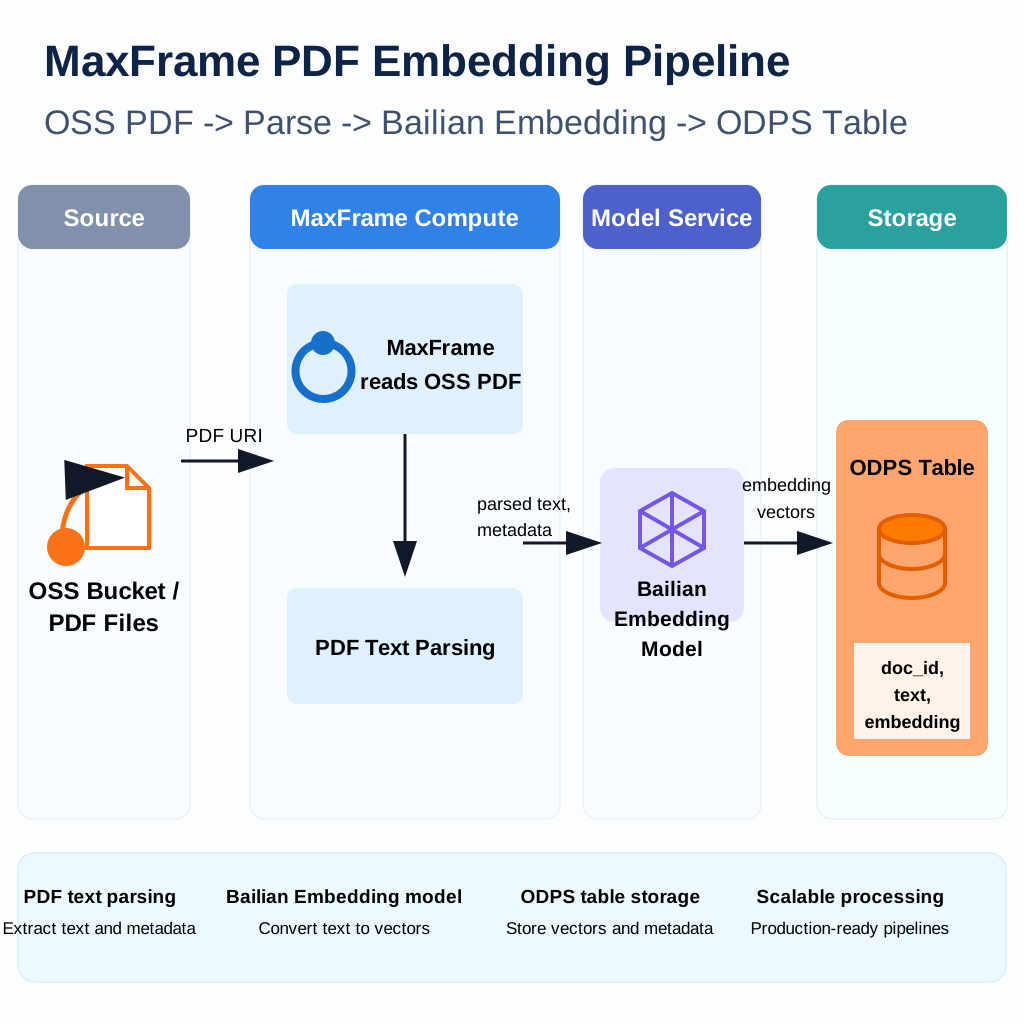
Papers, contracts, research reports, product manuals, white papers, and other PDF files carry a large amount of unstructured business knowledge. Raw PDFs often have diverse layouts, varying lengths, and no semantic splitting, which makes them hard to use directly for semantic retrieval, RAG question answering, document classification, and other downstream scenarios.
This best practice shows how to run a distributed PDF preprocessing pipeline on
MaxFrame and the MaxCompute DPE engine: extract text from PDFs, split the text
into semantic chunks, generate sentence embeddings with the Bailian
text-embedding-v4 model, and write the resulting feature table back to
MaxCompute.
Applicable scenarios#
Document knowledge base RAG question answering.
Semantic retrieval over papers, contracts, and research reports.
Enterprise document classification and clustering.
Duplicate document and near-duplicate paragraph detection.
Text feature asset construction for retrieval, analytics, and data feedback loops.
Core workflow#
Prerequisites#
# |
Requirement |
Description |
|---|---|---|
1 |
MaxCompute enabled |
A MaxCompute project with valid Access ID / Access Key. |
2 |
DPE engine enabled |
PDF parsing UDFs and |
3 |
PDFs uploaded to OSS |
Source PDFs are uploaded to a target OSS bucket. |
4 |
OSS RAM role authorization |
MaxFrame reads PDFs through OSS file mount, which requires a configured Role ARN. |
5 |
Model Compute Service purchased |
Calling MaxCompute managed embedding models requires Model Compute Service to host inference traffic. |
6 |
MaxFrame SDK version |
Use MaxFrame SDK 2.6.0 or above ( |
Environment setup#
Configure ODPS credentials, OSS access, and the embedding model. Replace all placeholder values with your project-specific settings.
ODPS_ACCESS_ID = "<your_access_id>"
ODPS_ACCESS_KEY = "<your_access_key>"
ODPS_PROJECT = "<your_mc_project>"
ODPS_ENDPOINT = "https://service.<region>.maxcompute.aliyun.com/api"
OUTPUT_TABLE = "document_embedding_pipeline_results"

OSS_BUCKET_NAME = "<your_oss_bucket>"
OSS_ENDPOINT = "oss-<region>.aliyuncs.com"
OSS_DATA_PREFIX = "documents"
OSS_STORAGE_OPTIONS = {"role_arn": "<your_role_arn>"}

EMBED_MODEL_ID = "text-embedding-v4"
EMBED_MODEL_PROJECT = "bigdata_public_modelset"

CHUNK_SIZE = 2048
CHUNK_OVERLAP = 200
Open a MaxFrame session on DPE:
import maxframe
import pandas as pd
import maxframe.dataframe as md
from maxframe import new_session
from maxframe.config import options
from maxframe.udf import with_fs_mount, with_python_requirements, with_running_options
from odps import ODPS

o = ODPS(
    access_id=ODPS_ACCESS_ID,
    secret_access_key=ODPS_ACCESS_KEY,
    project=ODPS_PROJECT,
    endpoint=ODPS_ENDPOINT,
)

options.dag.settings = {
    "engine_order": ["DPE"],
    "unavailable_engines": ["MCSQL", "SPE"],
}
options.session.gu_quota_name = "<your_gu_quota_name>"

session = new_session(o)
print(f"Session ID : {session.session_id}")
print(f"LogView    : {session.get_logview_address()}")
Step 1. Prepare PDF paths#
Provide PDF paths relative to the OSS bucket. The UDF mounts the bucket to
/mnt/oss and opens each file as /mnt/oss/<pdf_path>.
PDF_PATHS = [
    "documents/attention_is_all_you_need.pdf",
    "documents/bert.pdf",
    "documents/gpt3.pdf",
    "documents/llama.pdf",
    "documents/llama2.pdf",
]

paths_df = md.DataFrame(pd.DataFrame({"pdf_path": PDF_PATHS}))
Step 2. Parse PDFs and split into chunks#
The UDF has a single responsibility: use pymupdf to extract page text and
RecursiveCharacterTextSplitter to split by paragraph and sentence
boundaries. The output schema is pdf_path, page_number, and
chunk_text.
@with_python_requirements("pymupdf", "langchain-text-splitters")
@with_running_options(engine="dpe", cpu=8, memory=16)
@with_fs_mount(
    f"oss://{OSS_ENDPOINT}/{OSS_BUCKET_NAME}/",
    "/mnt/oss",
    storage_options=OSS_STORAGE_OPTIONS,
)
def extract_chunks(chunk):
    """Extract text and chunk each PDF into row-level records."""
    import os

    import pymupdf
    from langchain_text_splitters import RecursiveCharacterTextSplitter

    splitter = RecursiveCharacterTextSplitter(
        chunk_size=CHUNK_SIZE,
        chunk_overlap=CHUNK_OVERLAP,
        separators=["\n\n", "\n", "。", "!", "?", ". ", "! ", "? ", " ", ""],
        keep_separator=True,
    )

    rows = []
    for pdf_path in chunk["pdf_path"].tolist():
        doc = pymupdf.Document(os.path.join("/mnt/oss", pdf_path))
        for page in doc:
            page_text = page.get_text()
            if not page_text or not page_text.strip():
                continue
            for chunk_text in splitter.split_text(page_text):
                rows.append(
                    {
                        "pdf_path": pdf_path,
                        "page_number": page.number,
                        "chunk_text": chunk_text,
                    }
                )

    return pd.DataFrame(
        rows,
        columns=["pdf_path", "page_number", "chunk_text"],
    )

chunks_df = paths_df.mf.apply_chunk(
    extract_chunks,
    output_type="dataframe",
    dtypes=pd.Series(
        {
            "pdf_path": "object",
            "page_number": "int64",
            "chunk_text": "object",
        }
    ),
)

chunks_df.execute().fetch()
Step 3. Generate embeddings with Bailian#
Use read_odps_model to load the public Bailian text-embedding-v4 model
from MaxCompute and generate embeddings for the chunk_text column in batch.
The embedding call is fully managed by MaxCompute Model Compute Service.
available_models = list(o.list_models(project=EMBED_MODEL_PROJECT))
[m.name for m in available_models if m.name == EMBED_MODEL_ID]
from maxframe.learn.utils import read_odps_model

llm = read_odps_model(EMBED_MODEL_ID, project=EMBED_MODEL_PROJECT)
embeddings = llm.embed(
    chunks_df["chunk_text"],
    running_options={"max_tokens": 1024, "verbose": True},
    # By default the response DataFrame includes provider response
    # metadata. ``simple_output=True`` returns the embedding data directly.
    simple_output=True,
)

# Use the ``response`` column as the raw embedding JSON.
result_df = chunks_df.assign(embedding=embeddings["response"])
result_df.execute().fetch()
Step 4. Convert embedding JSON#
Bailian embed() returns a JSON string such as
{"data": [{"embedding": [...]}], ...}. Convert it to a flat float-array JSON
string so downstream retrieval and similarity jobs can read the vector column
directly.
def parse_embedding(s):
    """Extract the raw Bailian embedding JSON as a flat float-array JSON string."""
    import json

    if s is None:
        return None
    return json.dumps(json.loads(s)["data"][0]["embedding"])

result_df = result_df.assign(
    embedding=result_df["embedding"].map(parse_embedding, dtype="object")
)

result_df["embedding"].execute().fetch()
Step 5. Write the result table#
Persist the processed chunks and embeddings to MaxCompute.
md.to_odps_table(result_df, OUTPUT_TABLE, overwrite=True).execute()
print(f"Result written to {OUTPUT_TABLE}")
When the job is finished, release the MaxFrame session:
session.destroy()
Troubleshooting#
Issue |
Cause |
Solution |
|---|---|---|
|
DPE is not enabled for the project. |
Contact the administrator to enable the DPE engine. |
|
RAM role is misconfigured. |
Verify |
|
The PDF file is corrupted or encrypted. |
Pre-filter unreadable PDFs, or catch exceptions in the UDF and skip failed files. |
Write-table failure or column-type error |
|
Align |
|
The quota and MaxCompute project are in different regions. |
Make sure |